Blended Learning - Seamlessly Integrating Different Forms of Learning
Blended learning combines traditional face-to-face teaching and learning situations – often...
Producing and publishing a complete online course might seem like a big task. Breaking the course design process into smaller steps can make it easier to manage. You can also create templates and checklists of the different steps which make the content production easier and faster.
In this example, the online course creation process has been divided into the following steps:
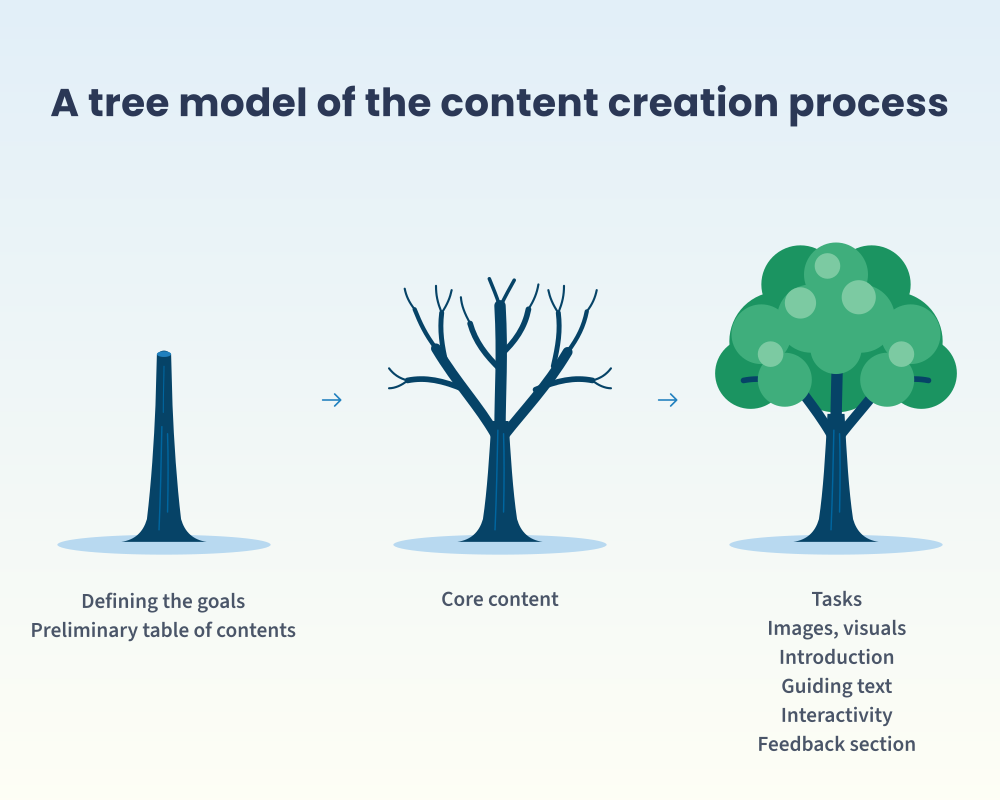
The steps in the course content production process can also be visualized by using this kind of tree model.
Start by defining the course's learning objectives. These objectives guide the creation of the actual course content, so it is important to consider them carefully.
Objectives can be viewed from two perspectives: the organization’s and the learner’s. From the organization’s perspective, consider why the course is being offered and what participants should be able to do after completing it. From the learner’s perspective, define the benefits participants will gain and why the course is worth their time.
It is also important to determine the practical aspects of course participation in advance, as these influence factors such as course length and the type of content that can be included.
Define the target audience, meaning the learners for whom the course is intended. Will participants need prior knowledge? What learning habits are typical for them, such as mobile learning? The target audience will shape the course content. If the course is intended for a broad audience, such as all employees within an organization, the content may need to remain fairly general. If the audience is a smaller, specialized group, the content can be more detailed and explore the topic in greater depth without explaining basic concepts.
Also define the course's schedule, including how much time participants are expected to spend on the course and whether there is a specific target schedule for completing the course or whether learners can progress at their own pace. For example, a course designed to take 30 minutes and be completed within a week cannot be as extensive as a course that requires 10 hours and should be completed over several months.
Even before creating the actual content, it is worth considering how the course will be delivered, what kinds of activities it can include, and what type of interaction can be created between participants.
Depending on the course objectives, activities may be designed for example to support learning, assess knowledge, or encourage self-reflection. At this stage, you can also consider whether the course will be completed entirely independently or whether it can include discussions, peer reviews, or a chat feature to facilitate interaction between participants. Whether features such as peer review are practical often depends on the number of active participants. If learners complete the course infrequently and at their own pace, independent activities are usually more suitable. However, if many learners are taking the course simultaneously, discussions and peer-reviewed tasks can be highly effective additions.
Define how the course will be assessed and whether there are specific requirements for successful completion. Not all courses require formal assessment. However, if learning outcomes must be demonstrated, or if participants need certification or proof of completion, assessment criteria should be clearly defined. Requirements may include for example achieving a certain minimum score or completing mandatory tasks.
Also decide on the assessment method, which is typically either automatic, manual, or peer review. With automatic assessment, the learners receive results immediately, reducing the workload for instructors. Instructor assessment allows personalized feedback for each learner, which supports learning but requires more instructor time. Peer assessment means that learners evaluate one another’s work, creating opportunities for collaborative learning while reducing the instructor’s workload.
To make the content creation easier, start by creating a preliminary course outline or table of contents. Begin by listing the key topics that must be covered to achieve the course objectives. These become your course's chapters. For each chapter, identify the most important content or learning objectives. These can often be used directly as subheadings.
A well-planned outline makes it easier to define the scope of the course, organize content logically, and create a clear structure that improves usability. In addition to the main content chapters, every course should include an introduction and a conclusion chapter.
The outline created at this stage is only a draft and may evolve as planning progresses. However, having a structure in place makes it much easier to start producing the core content.
Tip! If you want to create a consistent learning experience across your organization, use an introduction template for all your courses. This also makes the content creation easier for course creators.
How can you make sure that the learners actually learn the material? Simple techniques, such as repetition and tasks, can significantly enhance learning outcomes.
Repetition is a critical part of learning, including online learning. To reinforce learning, include summaries of key concepts, review sections, or chapter recaps.
Using varied content formats and visual elements such as images, diagrams, and videos makes courses more engaging and supports learning.
In general, presenting the same content in multiple formats helps learners retain information. Reading something once does not guarantee long-term understanding or memory. However, when learners encounter the same information in several forms, such as text, a diagram, and a task requiring application of knowledge, they receive repetition, which enhances learning, and additionally, get a more engaging user experience as they are consuming the material in multiple different ways. This also accommodates different learning preferences.
Make sure that the language in online courses is understandable and it's clear to the user how to proceed in the course. A logical structure and guiding text help the users to navigate in the course and complete it successfully. Guiding text can include for example instructions on how to complete the course, summaries at the beginning of chapters, instructions on how to complete the tasks, or how to proceed in the course, such as "Next, we will move on to...", "In this chapter, you will learn....".
Online courses benefit from variety of task types, such as knowledge checks, practical application exercises, reflection activities, prioritization tasks, learner engagement tasks, social learning, and self-assessments. With tasks, the learner is actively learning, and not just passively reading, which improves retention. The tasks should be distributed throughout the course rather than only placed at the end.
The tasks can have multiple functions, depending on the course goals. For example, the course that teaches a certain skill needs to have knowledge checks to ensure what the learner has learned. Here are some use cases for tasks:
And here are some ideas for tasks:
Storification - using stories, anecdotes, and real-life examples as part of the learning material - brings the topic to be studied closer to the learner's everyday life and supports retention. Use storification for example in illustrative examples where you describe a real-world challenge, or for introducing a topic with a case study, or in tasks and discussions where you can depict example situations and ask the user to choose the correct or most suitable course of action.
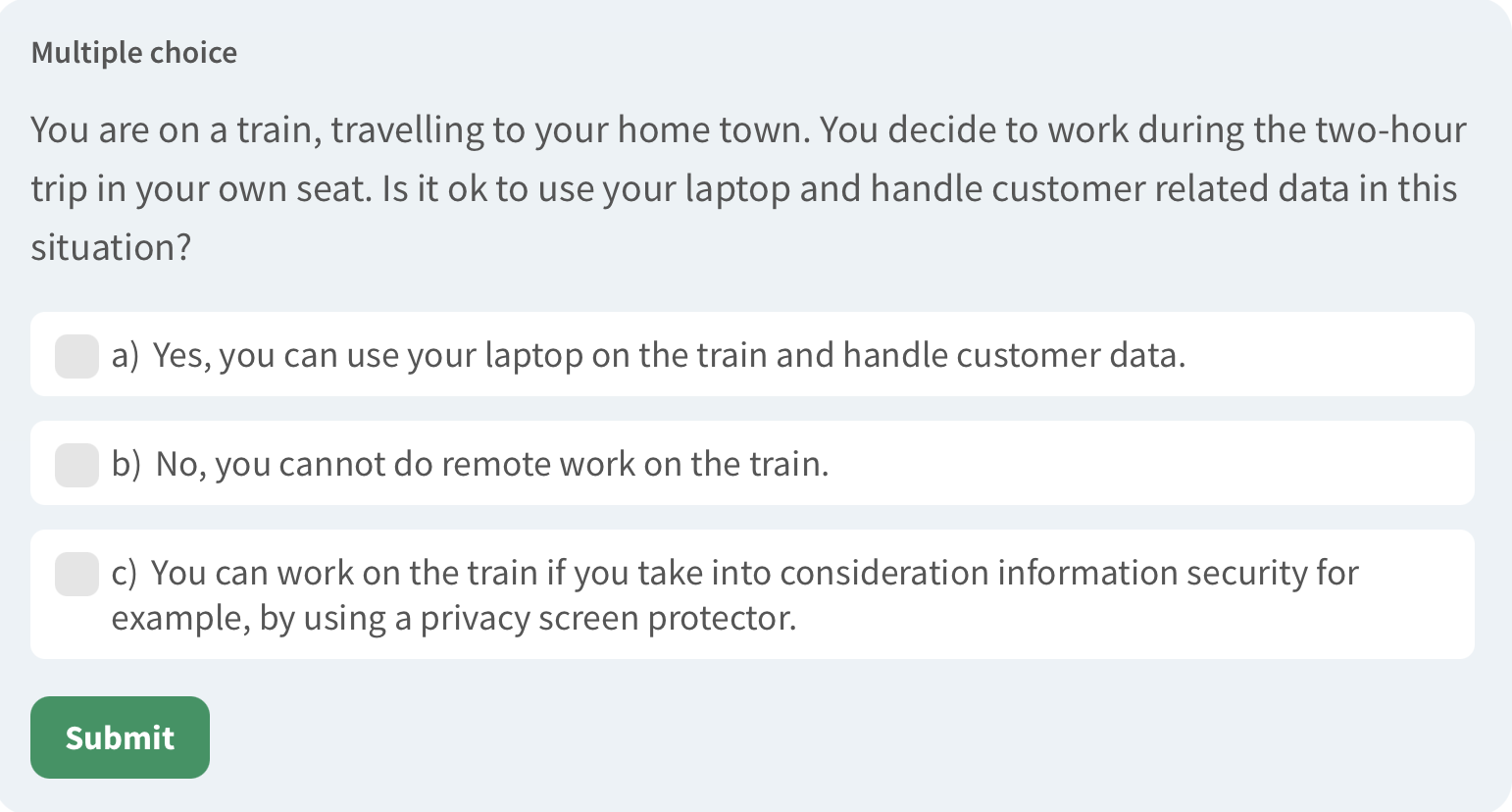
Use storification to integrate real-life examples to the learning material.
Interactivity - engagement between the learners and the learning environment, such as automatically graded tasks or discussions between the participants - activates learners and enhances the learning experience. Ways to increase interactivity include:
Read more about interactivity in online courses in this blog post.
After the course has been published, it should not be forgotten - instead, you should monitor its performance and improve it further as needed. To do this, you can gather course feedback from participants, track the course's learning analytics, analyze the course's impact, and create a process for updating the course.
Create a process for updating courses: define who is responsible for updating the course and what should be reviewed from the course and how often. Courses should be reviewed regularly, for example once or twice a year, depending on the topic and how quickly the information will become outdated. Check the course content and if necessary, update outdated information such as processes, practices, and roles. Test that the content still works (links, videos, files). Additionally, make sure that the visual design is still up to date. Utilize the results of the feedback survey and the platform's learning analytics and improve the course based on those.
You can easily delegate the online course updating process for content creators for example by creating a checklist that includes all the things that they should check from the course while doing the review.
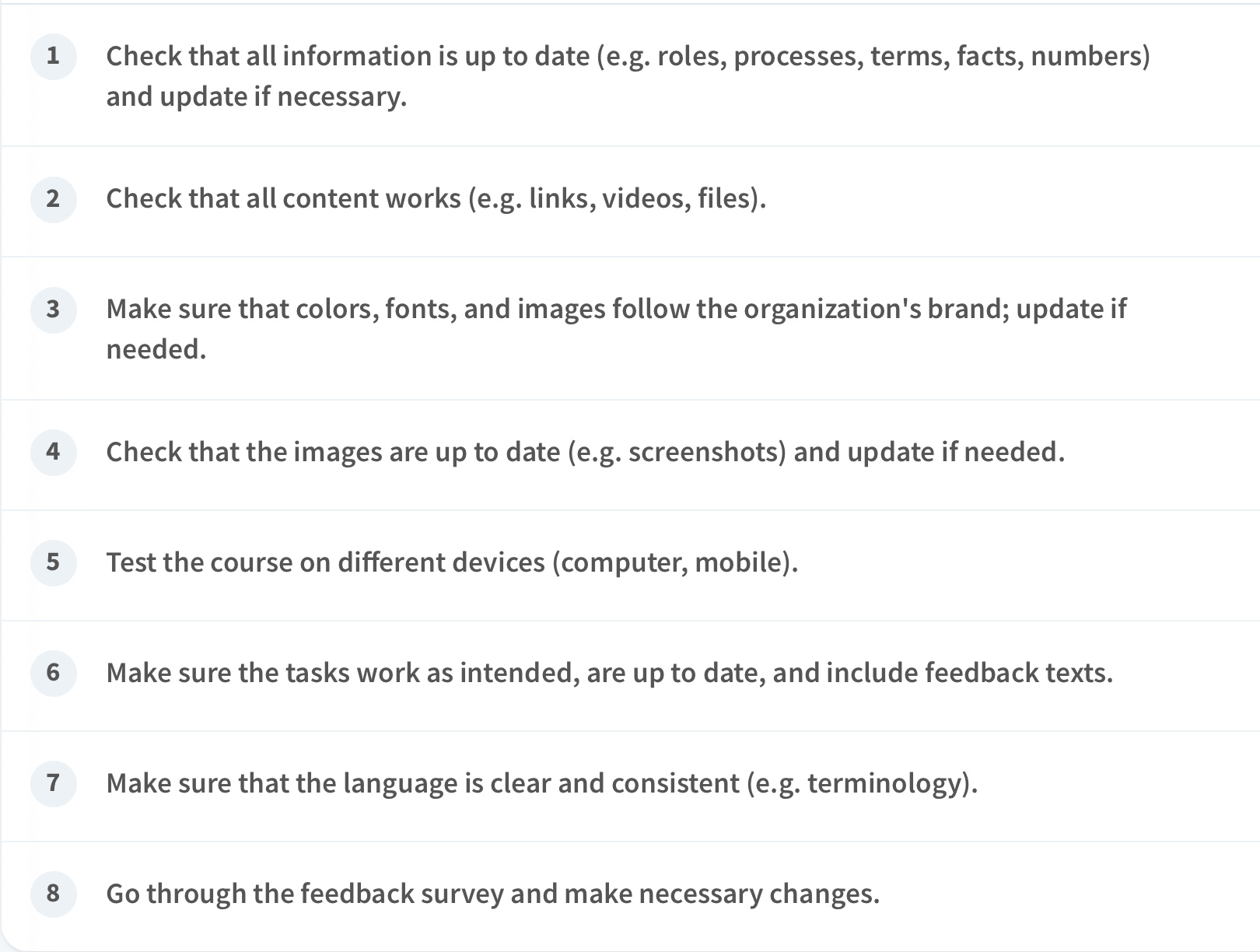
Checklist for updating an online course.
One section that you should always add to your online course is a feedback survey which allows you to improve the course for future users. Gathering feedback gives you information on how the course goals have been met and how learners have learned. You can ask for feedback using a separate feedback survey at the end of the course, including statements and open questions. Utilize concrete questions for it makes it easier for the user to give feedback. You can also use templates for feedback surveys across all the courses. In the feedback survey, you can ask for example about the following topics:
You can track the following things from learning analytics provided by the online learning platform:
When the online course has been published and completed by learners, its effectiveness can be evaluated. This can be done from two perspectives. The first one is the user's perspective: is the learning in the course meaningful and is the content motivating for the learners. This information can be gathered through feedback surveys. The other perspective is the organizational impact: what are the practical effects of the course and did the course lead to some measurable change. To assess this impact, review the course goals and determine whether they were achieved.
Read a blog post about the topic: How to measure the ROI of online training.
Creating an online course can seem like a large and demanding project, but by dividing the project into smaller steps and applying some easy design principles you will be able to produce the course easier and create an engaging course and a good learning experience for the learners. Interactivity, repetition, tasks, and active learning ensure that the course enhances learning outcomes, and continuous improvement and an online course updating process ensure that the course remains relevant for the users long after its publication.
Blended learning combines traditional face-to-face teaching and learning situations – often...
Students can participate in online learning from anywhere, anytime. Online courses enable students...
Online learning enables cost-efficient training and flexible timetables. Learn more about how...