Growth is a conversation, not a form.
- Structured & consistent discussions
- Clear documentation in one place
- Track progress with ease
Why digital development discussions
Turn performance reviews into performance drivers
Four reasons HR teams are switching from scattered Word docs and emails to structured digital conversation notes.
A consistent process
Better transparency
Clear documentation
Modern employee experience
AI add-on for conversation notes
AI‑powered development discussion analysis
AI development discussion analysis Full text version of the video, less than 1.5 min read.
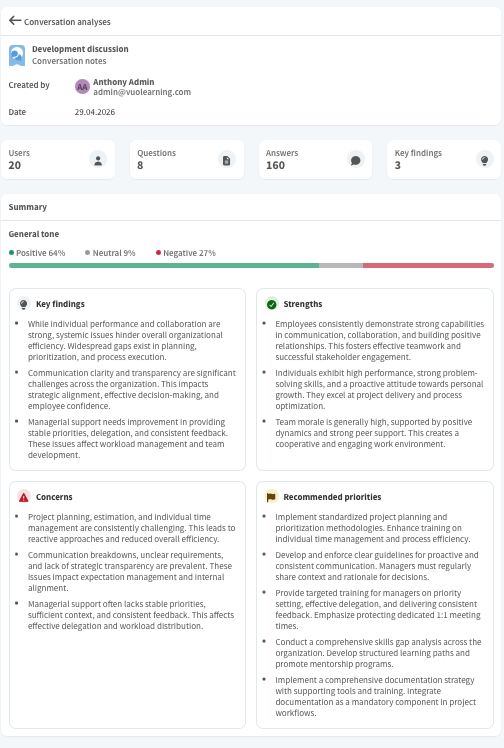
Vuolearning's AI tool for analyzing development discussions helps you to change routine employee feedback into strategic business intelligence.
The tool analyzes the chosen development discussions, anonymizing all data and giving summary of the discussions.
You receive, for example, key findings, strengths, concerns, and recommended priorities. The tool also lists some strategic observations from the material and gives recommended actions.
You can see each question also in more detail and if there are some general observations about the question.
Additionally, the AI might recognize some general themes and trends from the data.
This analysis can then be used to make better decisions concerning the future of the organization.
Standardize development discussions
Why to digitalize development discussions Full text version of the video, less than 1 min read.
Digitalizing development discussions in Vuolearning has many benefits.
You can create a template that all supervisors use with their team members, which means that each discussion has a clear structure, and as everyone uses the same format, discussions are consistent in the whole organization.
Both the manager and the employee can see the goals, notes, and agreed actions at any time, which increases transparency.
When all discussions are documented on the platform, they are easy to find, and it's also easier to prepare for upcoming discussions.
Development discussion use cases for HR teams
One tool, many conversations
Support every conversation type with the same clarity, structure, and trackable outcomes.
Development discussions
- Review goals, achievements, and development areas
- Create a clear personal development plan
- Track progress throughout the year
Regular 1:1 discussions
- How was the employee's onboarding experience?
- Continuous check-ins and pulse conversations
- How can we improve the onboarding?
Feedback discussions
- Document and review feedback
- Supports long-term development
- Fair and transparent evaluation
Team discussions
- Align shared team goals
- Review and update team practices
- Increase transparency across teams
How development discussions work
How conversation notes work
Turn every conversation into clear outcomes with guided preparation, real-time notes, and actionable follow-ups.
-
01HR
Preparation
Build the conversation templates and assign them to the right people.
-
02Manager + Employee
The Discussion
Guided conversation covers goals, achievements, and development areas. Notes are documented in real time.
-
03System
Action Plan
Agreed next steps, development plans, and follow-ups are saved and easy to access afterwards.
How to fill in a development discussion Full text version of the video, less than 1 min read.
Let's see how a supervisor can fill in a development discussion for their team member in Vuolearning.
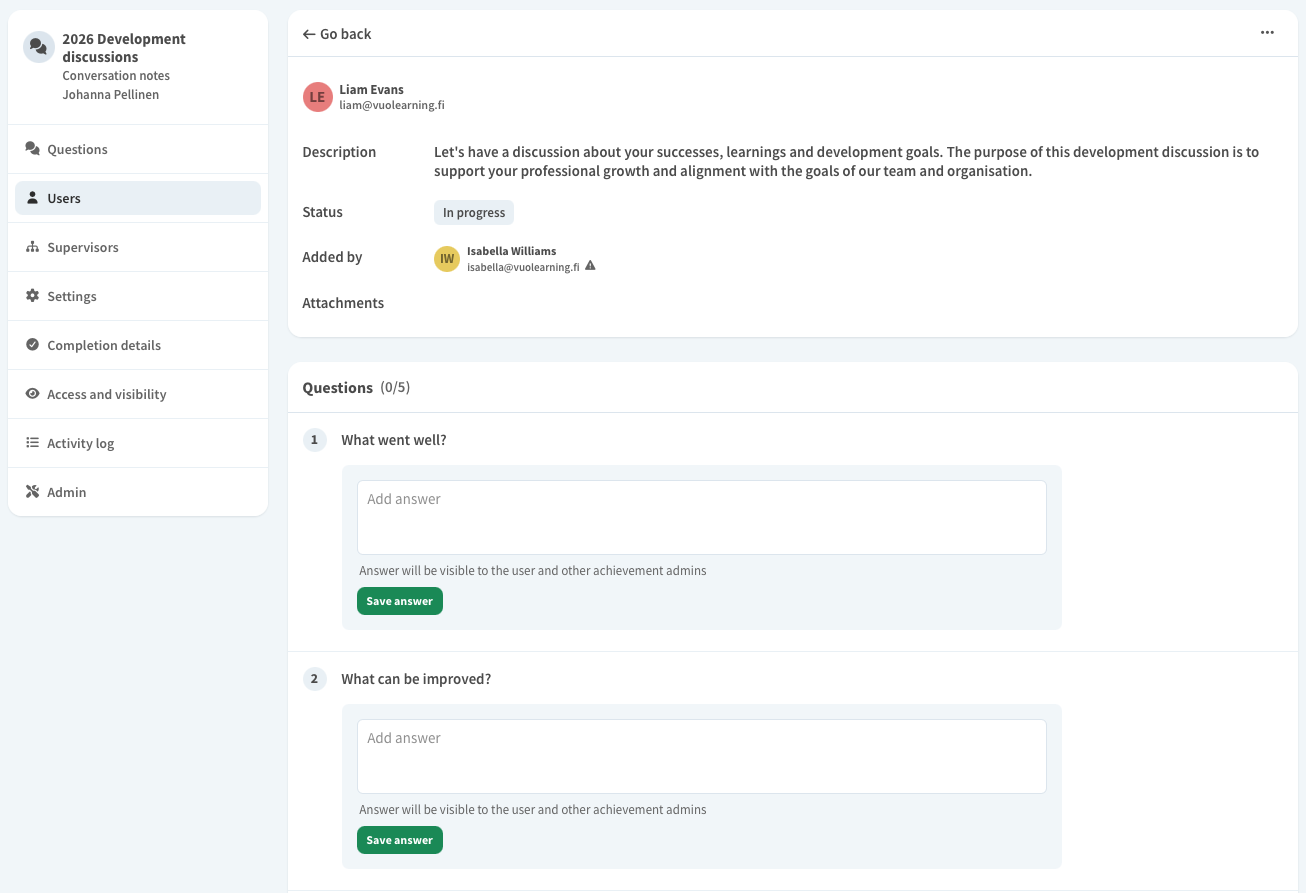
Go to the discussion from Achievements or My Team page. Add your team member to the discussion.
Open the discussion and add the answers to each question. When all the questions are answered, the discussion is automatically marked as completed.
If the settings allow it, mark the conversation as closed, after which it cannot be edited anymore. Track your team's progress and make sure everyone completes their discussions on schedule.
Start a modern way of running development discussions.
When discussions are properly documented, both employee experience and leadership quality improve. Vuolearning offers an easy and flexible solution.